

The graphical user frontend RODEONmodular
In general, the software is designed to be intuitive.
This menu item controls the whole horizontal angle of the panoramic photo.
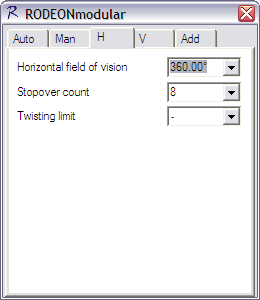
Normally, RODEONmodular optimizes all turns to always move along the shortest distances to save time. This means that RODEONmodular turns to 360° instead of 0° if the last photo was taken on a horizontal angle greater than 180°. This behavior is deactivated by selecting a maximal angular of 360°. Thus, twisted cables are prevented.
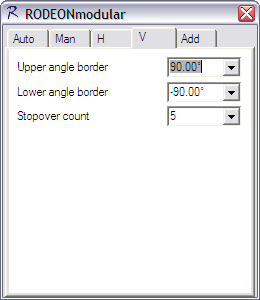
If the upper or lower angle border becomes 90° (Vertex) or -90° (Nadir), only one picture will be triggered in this position. In all other vertical positions, the number of pictures that were selected in the 'Horizontal' menu are captured (Multi-Row).
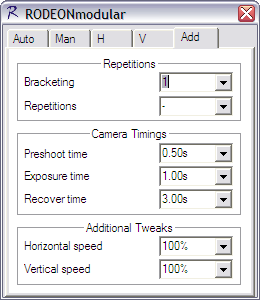
For special camera features or situations, it is useful to take several photos in one position (e.g. for a sequence of different exposures such as HDR). You can select the number of triggers for each position in this menu (Bracketing). Many camera models support this automatic HDR mode.
Preshoot time: The time the camera needs to focus (half-pressed trigger). You can use this waiting period after RODEONmodular stops driving to avoid mechanical swinging.
Exposure time: The time between trigger and continue moving.
Recover Time: The minimal time between two triggers. It is used to avoid triggering until the camera is ready.
The Speed describes the rotation speed of the drives. We recommend a lower factor especially for heavy cameras.
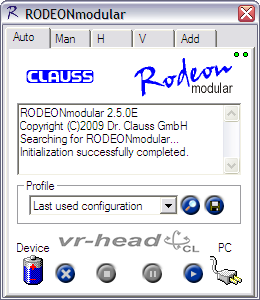
The software writes the actual configuration to a file named "Last used settings" when it completes. This file itself contains detailed descriptions of the script and commands used. Other configurations with other filenames can be saved or loaded in the program window. This way, you are able to store many preferred configurations.
Controlling the head by the software is very easy. Simply use the three control buttons after starting up the software.
RODEON SOFTWARE DOWNLOADS
| RODEONmodular | With the help of an intuitive and easy-to-use controlling software for Windows PC or PDA all parameters for the "standard" panoramic photography are preset. Further settings were not integrated in order to keep track of the settings. The following screenshots are largely self-explanatory. |
| RODEONpreview 2 PRO | The advanced software for comfortable and efficient work. Faster and at the same time more secure with online preview. |
| RODEONobjectmove | RODEONobjectmove is a software suite for controlling the RODEON TurnTable and RODEON JumboDrive with USB camera control, live image preview (currently for Canon, Nikon, Phase One) and a direct object movie export as JavaScript application in HTML for direct internet publishing. |
| RODEON Scan | Controlling and recording software for the RODEONscan panorama laserscanner. |
| RODEONprocessor | Easy and automated post-processing Software for Laserscans FOR FREE. |
| RODEONmetric Modeler | Process your pointclouds to CAD-Models. Thanks to the integrated panorama technology and full support of the entire RODEON product family, colorization is fully automated. |
| RODEONmetric View | Free viewing application for RODEONscan pointclouds and models, including measuring function. |
How are the RODEON piX Series and RODEON Turntables controlled?
RODEON piX Series - via LAN or any WiFi-enabled (WLAN) device (smartphone, tablet, laptop, notebook, or PC) running any operating system (Windows, Mac OS X, Chromium OS, Unix, Android, iOS, Windows Mobile, Blackberry)
RODEON Turntables - via PDA/Handheld running Windows Mobile; Any Laptop or Notebook running Windows
Which interfaces are used by the RODEON Panoramic Heads and Turntables?
Standard:
- RODEON piX Series - LAN or any WiFi-enabled (WLAN)
- RODEON Turntables:
- Bluetooth (Class 1)
- RS-232; in connection with USB-adapter also possible with USB; Advantage: large cable legths until 50 m possible. Optional: Direct USB-interface with USB-Hub for image transfer during the recording process
How is the camera released?
The Panoramic Head or Turntable releases the camera via a camera trigger cable that is available for all common camera models. The settings are chosen directly at the camera. Together with RODEONpreview, camera triggering is also possible via LAN.
How are the recorded images transferred from the camera to the PC?
Manually via CF-card (readout via Card Reader at the Notebook/PC)
Direct image transfer from the camera to the Notebook via USB or Firewire
Is HDR photography also possible?
Yes, with RODEONmodular (standard controlling software) and RODEONpreview (controlling software with instant panorama preview)
Which languages are supported by RODEON controlling software?
German and English
Which operating systems are supported by RODEON controlling software?
For the RODEON piX Series - any operating system: Windows, Mac OS X, Chromium OS, Unix, Android, iOS, Windows Mobile, Blackberry
For the RODEON Turntable - Windows: all plattforms, also smartphones or Mac OS X 10.5 or newer via BootCamp, Parallels or vmWare